
Understanding the Cyber Insurability Posture Score
Understanding the CIPScore
The Cyber Insurability Posture Score (CIPScore) is Inscora's rating of how ready a client is for cyber insurance. It's built on ongoing analysis of what cyber insurers actually require, and draws on frameworks like ISO, NIST, and the Cyber Defense Matrix to identify control gaps that affect insurability.
The score combines two inputs: a discovery and insurability scan of the client's internet-facing assets (subdomains, related domains) and the answers from the cyber insurability assessment questionnaire. The result is a carrier-agnostic score broken down across 12 control categories, each scored independently.
ℹ️ Why these 12 controls? These 12 categories reflect what cyber insurance carriers consistently look at when underwriting. They represent the security practices that correlate most with reduced breach likelihood and better claim outcomes. Not every insurer weighs them the same way, but these categories cover the areas carriers care about most. Strong scores here directly affect your client's ability to get good terms, pricing, and coverage.
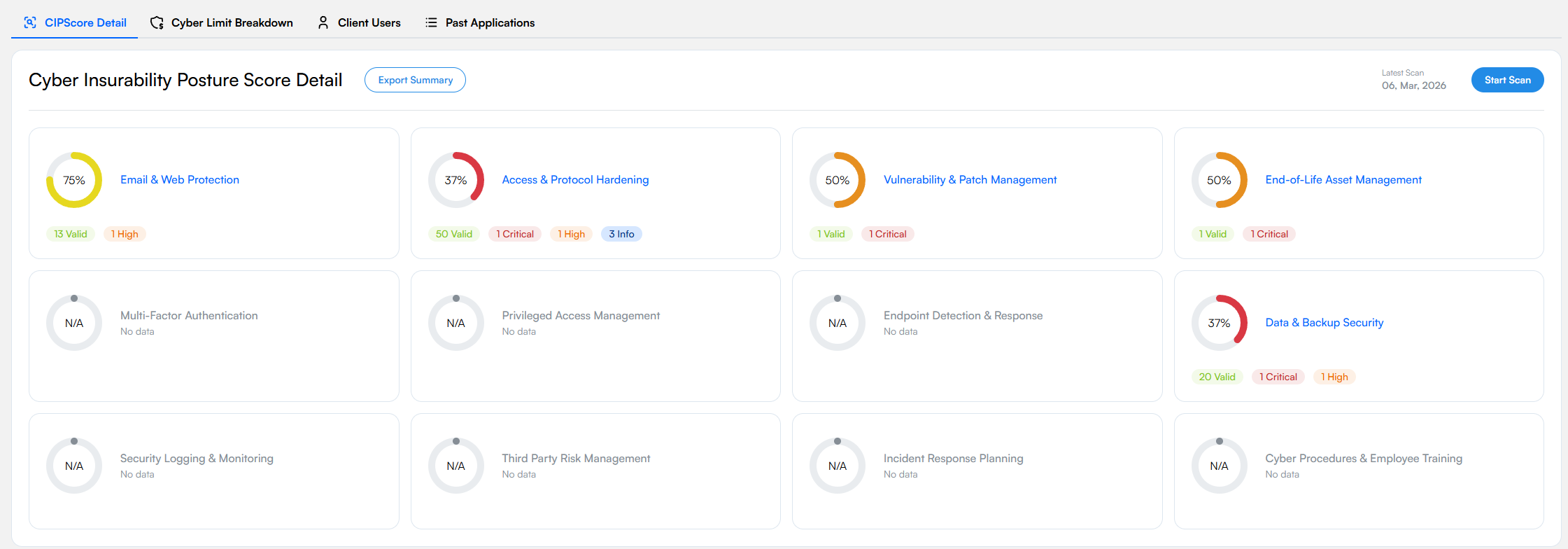
The CIPScore Detail view. Each of the 12 control categories contributes to the overall score.
The 12 Essential Control Categories
Each category card shows a percentage score, a color-coded ring, and a summary of insurability validations.
Email & Web Protection
Covers email security records (SPF, DKIM, DMARC), web content filtering, and TLS configuration. Email and web are the top attack vectors for phishing and malware, so insurers pay close attention to these controls. View all validations →
Access & Protocol Hardening
Looks at exposed services, open ports, and protocol-level security, especially remote access protocols like RDP. Unsecured remote access is one of the top entry points for ransomware, which makes it a priority for underwriters. View all validations →
Vulnerability & Patch Management
The insurability scan checks for known vulnerabilities in internet-facing systems. Timely patching, especially for critical and high-severity issues, is something insurers watch closely. View all validations →
End-of-Life Asset Management
Finds systems running unsupported or end-of-life (EOL) software. These systems can't be patched against new threats and are a red flag for underwriters. View all validations →
Multi-Factor Authentication
Checks whether MFA is enforced across exposed services, remote access, privileged accounts, and critical systems. Many carriers now treat MFA as a minimum requirement, since compromised credentials are involved in a large share of cyber incidents.
Privileged Access Management
Reviews who has elevated permissions, how those permissions are managed, and whether endpoint privilege management is in place. Limiting privileged access reduces the damage from a compromised account, which insurers view favorably.
Endpoint Detection & Response
Looks at EDR deployment across workstations, laptops, and servers. Insurers care not just about whether EDR is in place, but how much of the environment it actually covers. Partial deployment leaves gaps.
Data & Backup Security
Covers backup configurations and data protection: are backups encrypted, tested regularly, and stored offline? In a ransomware scenario, viable backups can be the difference between a full recovery and paying the ransom. View all validations →
Security Logging & Monitoring
Covers security event logging, SIEM, SOC operations, and alerting. Good monitoring means faster breach detection. This category looks at things like account lockout policies, audit log analysis, and SOC/MSSP coverage.
Third Party Risk Management
Looks at how the client manages cyber risks from vendors and supply chain partners. A breach at a third party can directly impact the client, so insurers want to see that vendor security is actively monitored.
Incident Response Planning
Does the client have a documented incident response plan? Do they run tabletop exercises? Do they have retainer agreements with IR providers? Organizations with tested response plans consistently see better outcomes when breaches happen.
Cyber Procedures & Employee Training
Covers security policies, procedures, and employee awareness training, including phishing simulations. Human error is still one of the top causes of cyber incidents. Frequent, quality training (not just the annual compliance checkbox) leads to measurably lower breach rates.
ℹ️ Insurability scan vs. full CIPScore. The insurability scan only scores categories it can assess from the outside (Email & Web Protection, Access & Protocol Hardening, Vulnerability & Patch Management, End-of-Life Asset Management). The rest (MFA, Incident Response, Employee Training, etc.) need input from the client through the cyber insurability assessment, a guided questionnaire you can drive from the platform.
Severity Levels
Within each category, individual insurability validations are tagged by severity. These levels indicate the impact on your client's cyber insurability posture:
Severity | Description |
|---|---|
🔴 Critical | Major issues that may prevent your client from getting cyber insurance. |
🟠 High | Issues that could impact premiums or renewal terms. |
🟡 Medium | General cyber risks that might not affect insurability but should still be addressed. |
🟤 Low | Minor issues with limited known impact, but worth monitoring. |
🟢 Valid | Positive indicators that improve your client's insurability. |
🔵 Info | Informational items for discussion with the insurer or broker. |
Each category in the CIPScore detail view shows a severity-count pill row right below its name - for example "30 Valid · 22 Critical · 6 High · 1 Medium" on Access & Protocol Hardening. The pills give you the category's posture at a glance without expanding every Insurability Validation underneath.
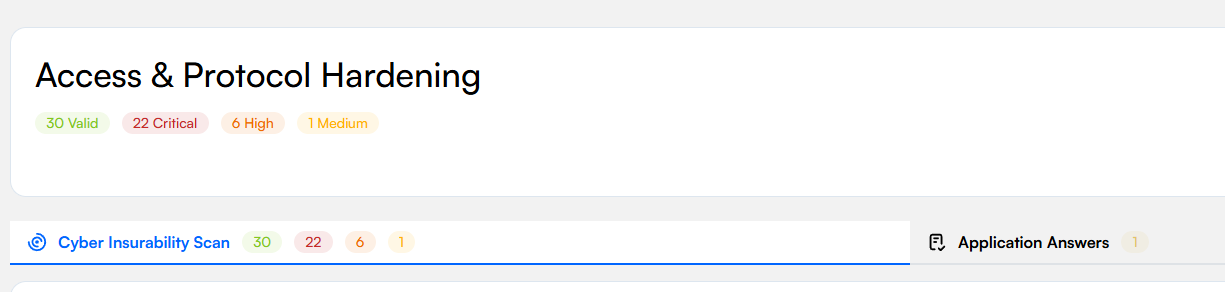
Severity-count pills sit beneath each category title - and again on the Cyber Insurability Scan tab - for a quick read of the breakdown.
Filtering by Severity
The pills are also clickable filters. Click any severity to show only validations with that severity; the other pills fade and the validation list below collapses to just the matching items. Click the selected pill again to clear the filter, or click another to switch. The same pills on the Cyber Insurability Scan tab work the same way. This is what you want when you're triaging - tap Critical to see only the urgent items, or tap Valid to walk a client through what's already working.
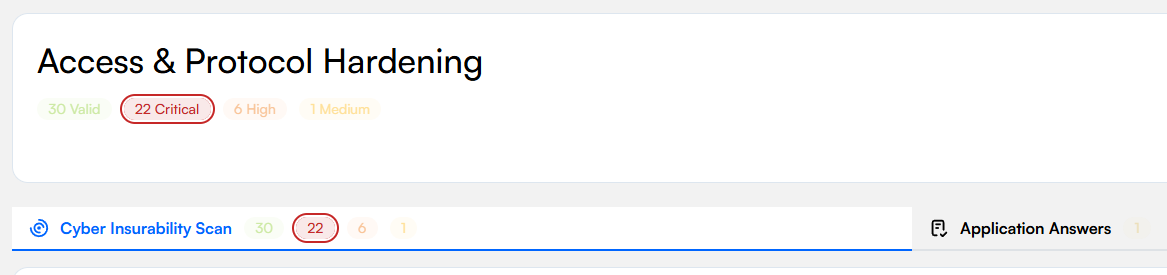
Click a severity pill to filter the list to just that severity. Click again to clear.
Marking an Insurability Scan Result: False Positive or Fixed
Expand any Insurability Validation on the Cyber Insurability Scan tab and each individual Insurability Scan Result appears as a row with columns for Check, Severity, Host, Domain, Technical Details, and Action. In the Action column, two icons let you tell Inscora that an insurability scan result doesn't reflect reality:
- Mark as False Positive (the eye-off icon): the detection itself is wrong, meaning the insurability scan flagged something that isn't actually present. A classic perimeter-scanning cause is a backport, where the OS vendor has patched a vulnerability but kept the old version number, so a version-based scan still matches that version to the CVE and reports it even though the fix is already in place.
- Mark as Fixed (the shield icon): the insurability scan result is real but you've handled it, either remediated, so you don't expect it on the next scan, or formally risk-accepted or covered by a compensating control, so it shouldn't keep counting against the posture.
Clicking an icon applies the mark; clicking the same icon again reverts the insurability scan result to Active. Marking an insurability scan result recomputes the client's CIPScore, since an insurability scan result you've dismissed or fixed no longer counts against the posture the way an active one does. The actions only appear on insurability scan results with an actionable severity (Critical, High, Medium, Low): informational ones have nothing to mark.
ℹ️ Marks are yours, and insurability scans respect them. A False Positive or Fixed mark is a deliberate override you set; it takes precedence over the insurability scan's own status until you clear it. A later scan that still detects the issue keeps your mark in view, so you always know what was dismissed and why the score reflects it.
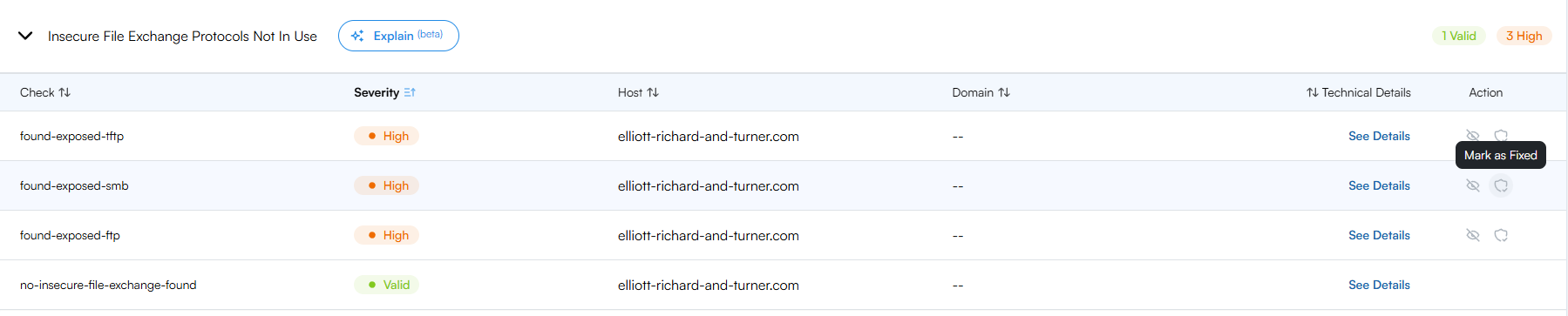
Each actionable insurability scan result row carries the False Positive (eye-off) and Fixed (shield) actions in the Action column.
Score Over Time
The CIPScore card on the client page includes a small score-over-time line graph that traces the client's CIPScore across their scan history. Each recurring scan (every 30 days) and every manual scan adds a point to the line, so you can see at a glance whether the posture is improving, holding steady, or slipping ahead of renewal. A trend indicator under the graph shows the percentage change over the visible window.
The graph is most useful when you're showing a client the impact of remediation work between insurability scans, or when you're preparing a renewal conversation and need a one-glance visual of momentum on insurability.
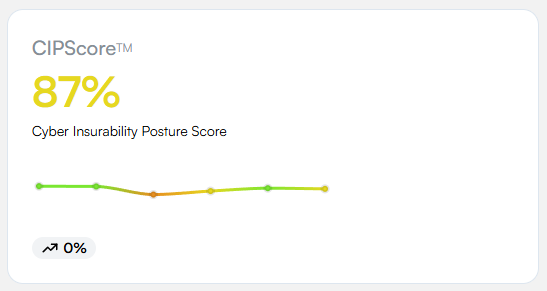
The score-over-time line on the CIPScore card. Each point is a past scan; the trend indicator summarizes the visible window.
N/A Categories
Some categories may show N/A / "No data." This means the insurability scan can't assess that area from the outside (e.g. internal MFA policies, incident response plans, employee training). These categories need client input, which is why completing the assessment is an important next step. In the future, this information will also be fetched automatically through the integrations you connect in Inscora.
Understanding Your Scan Results with Deep Analysis
Every validation group in the CIPScore detail view has a Deep Analysis toggle. Open it to expand an AI-generated briefing tailored to your client's specific result: what the validation means, why it matters to an underwriter, and how to address it.
💡 Deep Analysis is the fastest way to understand a result. Rather than guessing what a validation means or why a score is low, open Deep Analysis directly on that validation. It gives you a plain-language, insurer-aware explanation you can act on or walk a client through. See Deep Analysis for the full walkthrough.
Exporting the Cyber Insurability Report
From a client's CIPScore, use Export Summary to generate the Cyber Insurability Report: a polished, client-ready PDF that packages the client's posture and your recommendations in one document. The report is also produced automatically when you complete an application. It's carrier-agnostic and branded for handing to the client or their broker.
ℹ️ What's in the report. The Cyber Insurability Report is built from the same data you see in the platform, arranged to be shared with your clients: an introduction, the CIPScore methodology and severity key, the client's overall score with the 12-category breakdown, a focused analysis of the top-priority gaps, and your own service recommendations.
The report is organized top to bottom as:
- Cover and introduction: the client name and generation date, a short "What is Inscora" explainer, and a table of contents.
- How the CIPScore works and how to read severity levels: the same methodology and severity levels (Critical, High, Medium, Low, Valid, Info) described above, so the reader can interpret the rest of the report.
- Cyber Insurability Posture Score: the client's overall score followed by the per-category detail, each category showing its score and its count of valid, critical, and high items. Categories that still need questionnaire input show "No score yet" and invite the client to fill that information in Inscora.
- Top Priorities: rather than listing every Insurability Concern it found, the report zooms in on the handful of most critical and high-concern categories. For each one it gives an Insurability Concerns analysis, written from an insurer's point of view. A concern can come from either side of the picture, or both, so it is split into two parts: Cyber Insurability Scan Validations (what the insurability scan found, e.g. a missing DMARC policy or an internet-exposed RDP service) and Cyber Assessment & Insurance Application Answers (what the client reported, shown alongside the actual question and answer). Each concern explains, in plain language, how it could affect the client's premium, terms, or ability to get covered.
- How your MSP can help: after each priority's concerns, the report recommends specific offers from your Service Catalog and explains how each one closes that gap. This section carries your MSP's name (for example "How Cloudwise Can Help") and turns the assessment into a concrete, actionable proposal, closing with a prompt to log in to Inscora.
💡 Curate your Service Catalog to shape the recommendations. The "How your MSP can help" section is generated from the enabled offers in your Service Catalog, matched to the client's gaps. Keeping your catalog complete and well-categorized directly improves the recommendations that land in front of your client.