
Access & Protocol Hardening
The Access & Protocol Hardening category assesses exposed services, open ports, and protocol-level security - particularly remote access protocols like RDP. Unsecured remote access is one of the leading entry points for ransomware attacks. Hardening these protocols and minimizing the exposed attack surface is a top priority for underwriters.
This category is fully assessed from the insurability scan. Below is every validation Inscora performs within this category.
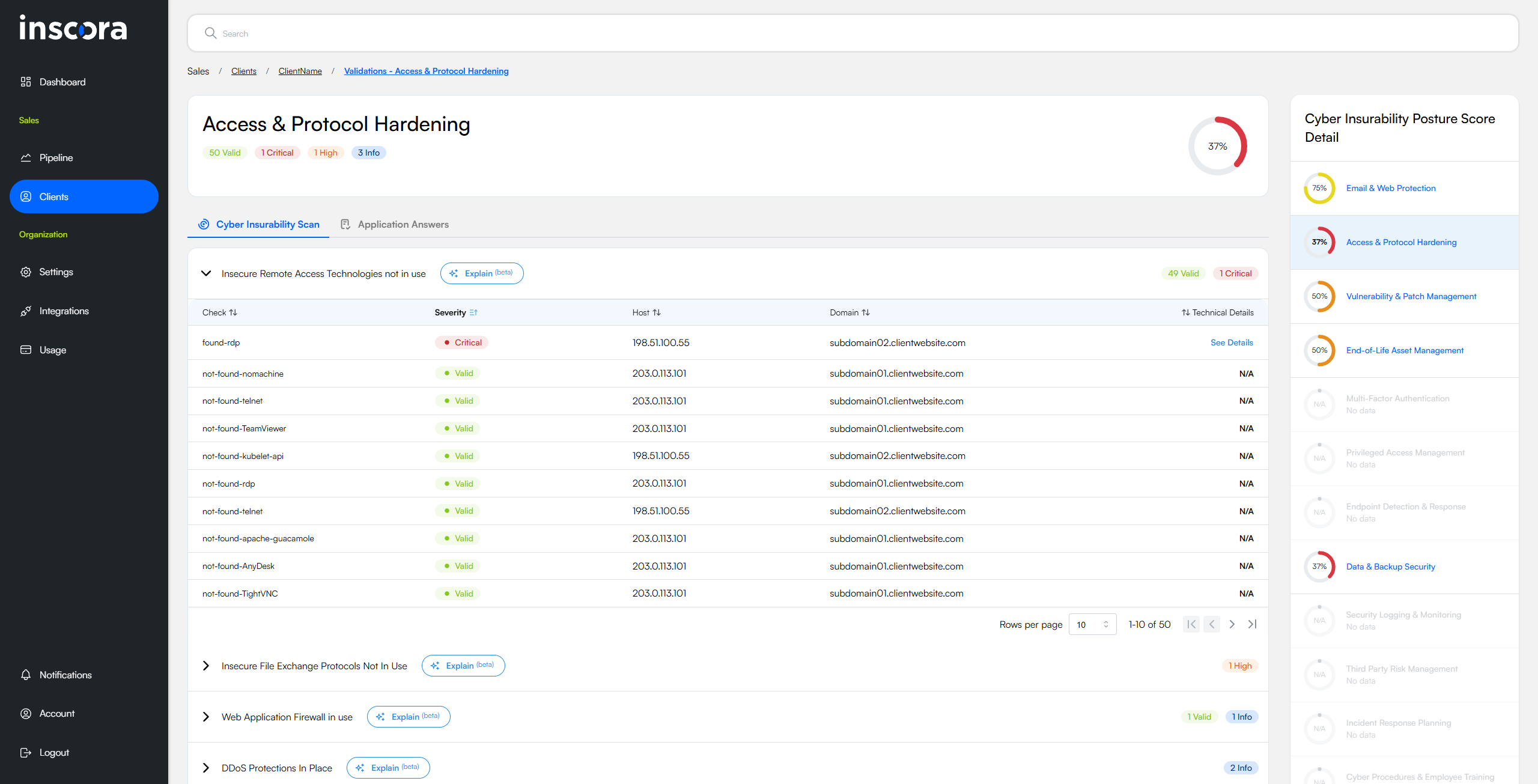
The Access & Protocol Hardening page with the first validation group expanded, showing individual checks across discovered hosts and domains.
Remote Access Controls
These validations evaluate whether remote access services are properly secured or unnecessarily exposed to the internet.
Insecure Remote Access Technologies Not in Use
This validation reviews the services that a computer exposes to the internet and checks whether any well-known remote-access or administrative tools, as well as older unprotected management protocols, are reachable from outside the organisation. It reports a negative result when no such services are found and a critical alert when at least one of them is visible, indicating whether the machine is free from or susceptible to unwanted remote entry points.
Why this matters for insurability
Remote-access and legacy management services give an outsider a direct route into a system and, once reached, can lead to full control, data theft or the launch of further attacks across the network. Knowing whether these doors are open informs how likely, and how severe, such an intrusion might be. An insurer uses this information to gauge the probability of a costly incident and to understand whether the applicant has implemented basic controls that limit remote entry - factors that influence both coverage decisions and premium calculations.
RDP Protections in Place
This validation looks at computers that have Microsoft's Remote Desktop service open to the internet and checks whether basic safeguards (such as a gateway or pre-logon authentication) are active. A positive "protected" result means the service resists anonymous connection attempts. A negative result shows the log-on screen can be reached by anyone online, signalling that the system is effectively wide open.
Why this matters for insurability
Remote Desktop is a direct doorway into the operating system; when it lacks preliminary defences, attackers can repeatedly guess passwords, reuse stolen credentials or exploit software flaws to seize full control, often leading to ransomware outbreaks and business interruption. Knowing whether a company's exposed Remote Desktop sessions have protective barriers allows an insurer to gauge the likelihood and potential severity of such compromises when assessing cyber-risk and setting coverage terms.
VPN in Use
This validation checks whether the organisation's internet-facing system is acting as a gateway for remote-access virtual private network services such as OpenVPN, WireGuard or various commercial VPN appliances. A positive result means the host is offering a door through which employees or partners can connect into internal resources, indicating that log-in functionality is reachable from anywhere on the internet.
Why this matters for insurability
The presence of a publicly reachable VPN increases exposure because attackers can direct password-guessing, stolen-credential and vulnerability-exploitation efforts at the gateway; success would grant them a path into the private environment and the data that flows through it. For underwriting, knowledge of this exposure helps gauge the likelihood of unauthorised network entry, the adequacy of protective measures like multi-factor authentication and patch management, and the potential impact of a breach that uses the VPN as an entry point.
Ports & Protocol Exposure
These validations check for unnecessary open ports and insecure file-sharing protocols that expand the attack surface.
No Unintended Open Ports Visible from the Internet
This validation checks whether the organisation's publicly facing system is offering any network doorways that fall outside the small group of services it would normally plan to expose. It also observes whether a protective filter such as a web-application firewall appears to be shielding those doorways. If at least one unexpected doorway is reachable, the test records the exposure and notes the presence or absence of that protective layer, assigning more weight to the result when no filter is seen.
Why this matters for insurability
Unexpected public doorways expand the attack surface, providing intruders with direct opportunities to try stolen passwords, exploit software weaknesses or gain a foothold for deeper access, and the absence of a filtering control leaves the system entirely open to automated probing. Knowing whether these conditions exist allows an insurer to judge how rigorously the applicant manages its perimeter security and to better estimate the probability and potential impact of a breach when determining premiums and coverage terms.
No Insecure File Exchange Protocols
This validation checks whether the organisation has any file-sharing or remote-management services that can be reached directly from the internet, such as network folders, old-style file transfer (FTP), device backup shares or remote command channels. It looks for signs that common services used for moving or managing files, many of which offer weak or no sign-in protection, are visible to outsiders.
Why this matters for insurability
If any of these services are exposed, outsiders could read, copy, alter or delete stored information, harvest passwords, move deeper inside the network or plant harmful software, which raises the likelihood of data breaches, business interruption and costly recovery work. Knowing whether these entry points are open helps an insurer gauge how easily an attacker might access sensitive data or take control of systems, and therefore how likely and severe a claim resulting from unauthorised access, data loss or ransomware might be.
Firewall Detection
These validations identify whether the organisation's perimeter is protected by network firewalls - either on-premises hardware or cloud-based services.
Firewall in Use
This validation identifies which make or model of firewall the host presents to the internet by looking for brand names in publicly visible web pages, service banners or digital certificates. A positive result tells us the likely firewall brand and that its web-based control or user portal can be reached from outside the organisation.
Why this matters for insurability
Because an online-reachable firewall portal can be attacked through password guessing, stolen credentials or future software flaws, identifying its presence shows how easily an intruder could target the organisation's network edge. This knowledge allows an insurer to gauge the likelihood of unauthorised access, evaluate whether remote management is suitably restricted and patched, and factor that exposure into coverage terms and premium calculations.
Cloud Firewall in Use
This validation checks whether the organisation's website or application is routed through a web-application firewall managed by Microsoft Azure, Google Cloud or Amazon Web Services. It reveals that an additional cloud-based filtering layer stands between the internet and the company's own servers. The result is informational and indicates network architecture rather than a flaw.
Why this matters for insurability
Recognising the presence of a cloud-managed firewall shows that the organisation benefits from provider-level defences capable of blocking malicious traffic, absorbing denial-of-service attacks, and enforcing security rules that are updated continuously. A host protected by a reputable cloud firewall faces a reduced probability and severity of certain attacks, which directly informs risk assessment, coverage terms and premium calculations.
💡 Use Deep Analysis to understand any validation. For any question about what an insurability scan result means, how it affects insurability, or what to do about it, use the Deep Analysis button directly on that validation. The briefing is generated from your client's actual data and covers the technical meaning, insurability impact, real-world incident references, step-by-step remediation, and how your own services connect to the solution.